Monday, February 9, 2015

Self Description - Text

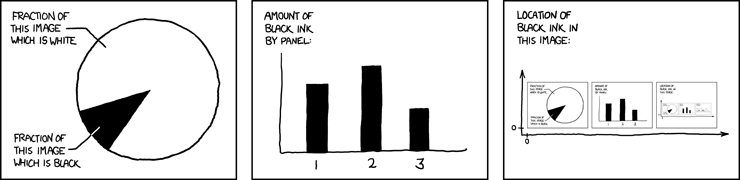
One of the xkcd.com comics that has really stuck with me over the years is this one:


The part that inspired me to write some Go code wasn't the image itself, but the hover text which reads as follows:

The contents of any one panel are dependent on the contents of every panel including itself. The graph of panel dependencies is complete and bidirectional, and each node has a loop. The mouseover text has two hundred and forty-two characters.

That was clever.  A bit of text that includes the length of the the text within the text itself.  So, I wrote some program that does it for any text up to 1,000 characters.  It ignores trailing spaces, but other than that, you type and it will append the length of the text (including the length of the text).

I went about it this way:

Calculate the text for a given integer ("one" for 1, "twelve" for 12, "thirty-seven" for 37) & store the length of that text representation.  You can find the loop for this here and the actual functions that convert number representations to text representations in this file.

Next, I call up my old buddy brute force. For every text length between 1 and 1,000, I take the text submitted (for example, "Hello World!") and I add the text representation of the current loop integer.  Then I check to see if the actual length of those two bits of text concatenated together equal the length (number wise) of the text form of the number.  If they are equal, great!  I have  a match and return it.  In this case:

Hello World! This text is fifty-nine characters in length.

It all happens here:


Make a simple bit of formatting text "%v %v". That's two place holders separated by 2 spaces (thus the + 2 on line 4).  Add the text to position one, add the text of the number to position two, and then see if the total length matches the numeric value of the number you put in position two.

There are more elegant ways, I'm sure.  Even for brute force, you could decide to start your brute loop with the length of the submitted text instead of 1.

That's almost all there is to it.  One thing I discovered is that sometimes, certain lengths of text just won't match up.  You can check everything and nothing will give you that nice recursive bit of text.  I got around that by giving more than one boiler plate phrase.  Instead of just using,  "This text is %v characters in length."

I use two more phrases that say the same thing but have different over all lengths.

firstParts := []string{"This text is %v characters in length.", "Text is %v characters long.", "Text is %v characters in length."}

So far one of these three phrases has caught every possible length between 1 & 1000. You can tweak the code to go higher if you want. Code is hosted on Github under the MIT license.

Code & installation instructions can be found here:

https://github.com/genghisjahn/textlength

Not including the embedded stuff, this text is two thousand nine hundred sixty-nine characters in length.

Tuesday, September 23, 2014

Life without a .Net

I wrote code exclusively on the Microsoft platform from 1997 until late 2013.  Sixteen years of ASP, ASP.Net, Visual Basic (4,5&6), VB.Net, wonderful C# and lots of MS SQL Server.  I could take a pile of computer parts, assemble them into a server, load the current flavor of Windows Server,  IIS and MS SQL Server, and assorted .Net Frameworks.  Then I could design a database, write the code(C#, assorted JavaScript add-ons), put it all together and Ker-Pow, a working software application/website/platform thingy.

And those applications worked!  And there were always more .Net jobs waiting for more things to be built.  And then, one day, while looking at Visual Studio 2013 I realized, I can't do this anymore.  I tried to slog through.  I know that everyone feels burnout from time to time, but I was starting to get a little worried at the thoughts going through my head.

Do you still want to be a software developer?  What else can I do?

I had recently moved from a startup (using .Net) to a big multi division company that had an Information Technology Department.  You know the kind of place I mean.  A cube farm that spanned an entire city block.  Bookshelves full for Wrox & MS Press titles.  Motivational slogans.  Well stocked Keurigs. Glass walled conference rooms.  End tables for network printers that had the \\unc\\ taped to the front.  My title was Senior Software Webgineer or some such.  The company was so big in fact, that the job I was hired to do had already been contracted out by the department that originally contacted IT.  Nobody told the hiring manager.  So after my on-boarding, there was not much for me to do.  I went to a few hackathons on the weekends.  That helped some, but the main problem was I didn't want to work in the .Net-corporate-IT-business-causal world anymore.  There was nothing wrong with the people at the company, it was all me.  I was tired of the dress code, the culture and the tech.  But at the same time I was scared to leave it.   It was all I knew.  That was part of what was bugging me.

I went to a meet-up for the relatively new programming language called Go (golang).  I had been messing around with the language in my free time just to break the .Net monotony.  The company that hosted the meet up said they were hiring and to talk to them if interested.  I was.  I knew this place would be different from what I had done in the past.  I also knew that I had zero skills in the tech stack they used.  At that point I'd written maybe 100 lines of Go, and they were primarily a Python/Django shop with a few projects in Go.  But I told them of my interest anyway and they suggested that I submit a resume.  I did.  Two interviews later I got the offer.  I was sitting in my cube in Corp-IT-Ville when I got the email.  I raised both hands in the air (clinched fists I think) and hissed, "Yessssss!"

I started out with new company with about 100 lines of Go code experience and a crash course in the Django tutorial.  But man, what a curve.  If it was just the language differences, that would have been easy enough, but it was more than that.  No Windows machines.  All developer machines were OSX.  And the development environment?  Well they used a tool called Vagrant, which housed a Linux build via Virtual Box with MySql and Gunicorn and Celery and Nginx and can you check out this feature branch and submit a PR that we can review?  Lots of command line...commands.  My head was spinning.  I was asking questions and Googling.  A lot.  I found myself thinking, "If this were on Windows, I'd do this thing this way!" But I wasn't on Windows.  Every day I was learning new things, which was great, but I was also finding out about new things that I did not know anything about.

And that was the worst part.  After about five months, I still was not able to turn things around as fast as I wanted to in my new job, but I also wasn't up to speed with the Microsoft world either.  New versions of C#, SQL Server and Visual Studio were released.  I did not know what the new features were.  I was trapped between the two worlds and I couldn't be productive in either of them like I wanted to be.  So what's a developer who is in over his head to do?

Slog through it.  Day after day.  Google dumb questions.  Ask dumb questions.  Get no where.  And then one day something makes a little bit of sense.  Slowly, I learned how to make changes to code that caused errors but...they were errors that I was expecting to see.  That's the Eureka moment.  When you can break source code in expected ways, soon you can make it do new things.  Things like, new features or bug fixes.  It's all the same thing, modifying the behavior of the code so that it responds the way it should.

Now I code in Go(golang) and Python.  I can form my thoughts into these new languages and produce thing that work.  Both of these languages have made me a better overall developer because they force me to think about code in different ways.  My pull requests still generate some chatter about how things could be improved, but then that's what pull requests are for.  Occasionally I'll get a, "oh, I didn't know you could do that" from some one.  It's cool when that happens, and not because it means I'm a big shot (ha!).  It's cool because, after having a team of developers patiently answer my questions for almost a year, it's nice to be able to give back, if only just a little bit.

To wrap this up, the journey was more than worth it.  Writing software is as fun as it's ever been.  It's hard to be a beginner in a field where you thought you knew a lot, but it's a necessary step if you want to continue to grow.


Saturday, February 15, 2014

Simple Git configurations for beginners (like me)

     As the shores of Microsoft disappear over the horizon, I find myself using tools that I used to think of as convoluted command line hacks and black magic.  Things like Git.  Of course, now that' I've used Git for several months in a for real multi-user multi-location environment, I love it.  Not only do I use it, but I'm comfortable enough now that I don't even use the GUI's.  I'm all CLI like the real hipster programmers.

I use Git and Github a lot these days.  It's cool and all but there were the inevitable hickups along the way.  Lots of Googling.   Here's a list of things that I wish had been all in one place when I started.  I provide this for others(my future self included) who might be new to Git/GIthub and want to lessen the learning curve a bit.  These tweaks assume you already have Git installed, a free Github account and an SSH key.  If not, create an account at Github and follow these steps to create an SSH key.  Moving on...

These are the problems I ran into early on and how they got fixed plus a few tweaks.
  1. Every time I do a git push to a repo on Github, I get asked for username and password.
    1. This is most likely because you did a git clone from HTTPS and not SSH.  I'd post a screen shot but the UI will probably change at some point.  Look on the github repo page, find the clone URL and make sure that you are copying the one for SSH.  More info.
  2. I make changes on my local branch, but when I push to Github it says, "Everything is up to date" even though it's not.
    1. Instead of doing git push, do git push origin <branch name>, like git push origin newfeature.  More info.
  3. I get asked for a pass phrase every time I do a push or pull.  More info.
    1. On the command line type:
      1. eval $(ssh-agent) <enter>
      2. ssh-add <enter>
  4. Helpful git aliases
    1. You can run this at the command line to make typing git commands a little easier.
      1. $ git config --global alias.co checkout 
      2. $ git config --global alias.br branch 
      3. $ git config --global alias.ci commit 
      4. $ git config --global alias.st status
    2. git commit becomes git ci.  git checkout becomes git co and git branch becomes git br.  (These aliases were taken from Scott Charon's book Pro Git)
  5. Color!
    1. It's nice to have some color on the command line.  Set this so that the git diff, git status and other commands return some color variation to make things easier to read.
      1. $ git config --global color.ui true
      2. More Info
  6. Lastly, instead of doing git commit -m 'message' all the time, you can do a git commit -av which will launch the default text editor, let you view the changes that are going into the commit AND type the commit message.  I like using Sublime, so updated the git config to do so.
    1. git config --global core.editor "subl -n -w"(More Info)
If you see anything wrong, let me know.  Present and future me thanks you, but not past me.  Past me is a corner cutting jerk.

Friday, January 10, 2014

Movies I saw in MMXIII

I looked over the list of movies I saw in the theater this past year and was surprised at the total: 21.  Below is a quick one or two sentence review of each film and links to purchase on Amazon (my blatant attempt at revenue).  A couple of these were late 2012, but I'm including them on the 2013 list since this is the first time I've done this.  Some of these are over a year old so my recollection may be a tad hazy.  However this isn't going to be much more than a thumbs up/down kind of thing, so it should be fine.  Keep in mind this is very subjective.  You're opinions may vary.

Movies I saw in the theater, 2013:
  1. Lincoln - Really liked it a lot.  I'll see anything with Daniel Day Lewis.  A great director with a bunch of great actors making a movie about a great man during a pivotal time in American history. What else is there to say?  Thumbs Up
  2. The Conjuring - It was okay.  Parts of the plot seemed thrown together but a good horror movie. Surely we can find better parts for Ron Livingston.  It's alright.
  3. Argo - I had no idea what to expect.  I knew almost nothing about the plot.  Liked it a lot.  I'd watch it again.  Solid film making and story telling.  No over the top grandstanding-look-at-me acting moments.  Thumbs Up
  4. Zero Dark Thirty - My favorite of the year.  Incredible movie about a subject that brings up many conflicting emotions.  Thumbs Up
  5. The Hobbit - Silly.  I really wanted to like it but it's silly.  I'll provide a link to the book instead.  Thumbs down.
  6. Killing Them Softly - Gritty-Ugly-People-Gangster(GUPG) movie.  If you like that sort of thing (I do) you'll love it.  James Gandolfini steals the show playing the role of Mickey, a gangster who is past his prime and eats and drinks too much.  Turns out there was a lot of foreshadowing in that role, which is sad.  Overall I give it a thumbs up
  7. Django Unchained - I usually love everything Tarantino does.  This one, I'm not sure what it was but I found myself turning away from the screen during the final blood bath shoot out.  I wanted to love it, I just didn't.  What I really wanted to see was Christopher Waltz as Col. Landa trying to fit in on Nantucket Island.  Thumbs....not sure yet.  I abstain.
  8. Stand Up Guys - I'm not sure why I liked this so much.  It's a good bad movie.  Another one of those Gritty-Ugly-People Gangster(GUPG) movies.  Pacino and Walken didn't act very much, but I didn't mind.  Thumbs Up.  You can also find this streaming on Netflix.
  9. Gangster Squad - I really wanted to like this.  I didn't expect it to be life changing, but I was hopeful it'd be solid.  Didn't work for me.  Thumbs down.
  10. The Berlin File - Interesting, but I'm not 100% sure what happened.  It was this movie that made me realize I should never look at my phone during a movie with subtitles.  It was different and not bad, so thumbs up.
  11. Skyfall - Daniel Craig's physique puts all 40+ year old men to shame.  Probably most of the 30+ and 20+ men too.  Fun movie.  It was great to see Javier Bardem as a bad guy again.  Thumbs up.
  12. Side Effects - Warning, this movie may cause excessive eye rolling.  Thumbs down.
  13. Evil Dead - Walked out of it.  Thumbs down.
  14. The Place Beyond The Pines - Amazing.  I will definitely watch this movie again.   Thumbs Up.
  15. The Iceman - Another Gritty-Ugly-People gangster movie.  The acting is great but the main character is a bad guy who's...a bad guy.  There are a few scene's where he's conflicted about the things he has done but...that's what happens.  I cheered when he got caught at the end.  If you don't like GUPG movies, this isn't for you.  Otherwise, thumbs slightly up.
  16. This Is The End - This was my first Seth Rogan movie.  I'll steer away from anything else he does, but I was entertained.  I could have done without the gross-out comedy bits but that's what some people are paying to see.  I get that.  Still, thumbs up.  Like I said, it made me laugh.
  17. Monster's U - It's hard to be objective about this because it's the first movie my wife and I took my daughter to see in a theater.  She was equal parts entertained and frightened.  We had fun.  Thumbs up.
  18. You're Next - Slasher horror film.  Different.  Campy.  I enjoyed it.  Sometimes movies trick you into cheering for the bad guy but you gotta pull for Erin in this one from start to finish.
  19. Grand Master - Beautiful.  Three intertwining plots that each could have been their own movie.  Really had to pay attention (No phone during sub-titled movies!) but I enjoyed it a lot.  Thumbs up.
  20. Gravity - Fantastic.  One of those rare movies where I think to myself, "Okay, maybe 3D isn't a complete waste of time."  If you're a selective pendant about how the laws of physic are portrayed in movies, then do us all a favor and don't see it.  For me, thumbs up!
  21. Old Boy (2013) - The new one, not the old one.  Meh.  I guess I'll see the original one of these days since it is so highly regarded.  But as far as the Spike Lee remake that I saw, thumbs down.

Thursday, October 31, 2013

Learning more about pointers in Go (Golang)

I really enjoy the Go book (found here) and the concise chapters and examples it provides. Today I started reading through chapter 9, specifically the section on embedded types. Embedded types allow Go structs to have an "is a" relationship instead of just a "has a" relationship.  I changed up the examples a little so I could make sure I was learning the concept and not just typing in some one else's code.  Take a look at the code for the two structs, Person and Android.

type Person struct {
 Name string
}

type Android struct {
 Person
 Model string
}

Person has a name and Android "is a" Person because I've added the type with no name(that's the embedded type part).  Model is a standard string property just like name is on Person.

I made the method "Talk" to go with the Person struct:

func (p *Person) Talk(TalkingTo *Person) {
 fmt.Printf("%v said, 'Hello there, %v.'\n", p.Name, TalkingTo.Name)
}

By working through the exercise, I was able to understand more about how pointers work.  Everything was going great.  Bob could talk to Frank and Frank could talk to Bob:

 Bob := Person{"Bob"}
 Frank := Person{"Frank"}

 Bob.Talk(&Frank)
 Frank.Talk(&Bob)

The Talk method accepts an argument of type Person pointer and I was able to use the & to get a pointer to the instance of the Person struct.  I was getting it.  If you ask for a pointer as a parameter, you can get that pointer by putting an & in front of a struct variable.  & means "give me a pointer to what follows."

Next I had Marty (an Android) talk to Bob(a Person):

 Marty := new(Android)
 Marty.Name = "Marty"
 Marty.Model = "T1000"

 Marty.Talk(&Bob)

No problem. Marty might be an Android but since it has a Person embedded type, it can talk like a Person struct can.

Next up I created an android called Arnold:

Arnold := Android{Person{"Arnold"}, "T1001"}

I also gave the android struct its own means of communication, called "Beep":

func (a *Android) Beep(BeepAt *Android) {
 fmt.Printf("%v beeped, 101010100001 at %v\n", a.Name, BeepAt.Name)
}

It's the same as the Talk method on the Person struct, just made for the Android struct.  The problem occurred when I tried to make Marty Beep at Arnold. This code generated an error:

Arnold.Beep(&Marty)

The error was:
cannot use &Marty (type **Android) as type *Android in function argument

The "**" should have been a tip off, but it stumped me for a while. I couldn't figure out why Arnold couldn't beep at Marty. Everybody else was talking just fine. What was the difference?  To my .Net/C# eyes, all of the variables were being instantiated the same way.  Then I realized that the Marty variable of type Android wasn't created the way the others were, it was using the new keyword.  In .Net new initializes the variable and fires off the constructor logic.  But that's not how things work in Go with the keyword new.  I did some reading and here's what I found:

In Go, the new keyword, "...allocates memory for all the fields, sets each of them to their zero value and returns a pointer."

By passing the Marty variable with an & in front of Marty, I was asking Go to pass a pointer to a pointer.  The function only accepts a pointer.  Marty was a variable that was a pointer to a struct instance of type Android while Arnold was just an instance of a struct of type Android.  The fix was simple once I understood what was going on.  I removed the & from Marty and the compiler was happy.  And more importantly, Arnold got to beep at Marty.

Arnold.Beep(Marty)
Arnold beeped, 101010100001 at Marty

I don't have pointers all figured out yet, but I'm closing in on them. Full source can be found here: Til next time.

Thursday, September 26, 2013

FizzBuzz Adventures in Golang

Before I get into Go Routines and Channels (which are both really cool), I thought I'd do some more direct C# to Go translation.  So, I took a FizzBuzz project that I had written in C#(here) and converted it to Go(here).  Here's a play by play over the main differences.  Some of it is obvious with only slight syntax differences.  But other parts are pretty different from C#.  That's what I'll focus on in this post.  Again, if I get something wrong please let me know in the comments or send me an email.

First up is the .go file(below) that contains the package main and the function main.  I'm creating an executable (.exe) with this file so I have to use the main package and have a function called main.  Very similar to a console application in .Net.  The import keyword denotes the packages I'm importing, "fmt" for formatting and writing text to the console and the line to my package that contains code for my Go implementation of FizzBuzz.

The program gets started with the func main on line 9.  The first thing I do is declare a variable and assign it a value.  The value is returned from a function called GetItems which is local to this file.  One thing you'll notice is the := syntax for variables.  This is similar to implicit typing that you can do in .Net.  In go, I'm saying create a variable called fbp and assign it a value of whatever is returned from the GetItems function.

If I wanted to declare an int and give it a value of 40, I would write agesoon :=40.  In C# I would write var agesoon = 40; and in VB it would be Dim agesoon = 40.  In all cases, the type of the variable is not stated explicitely but it is inferred based upon the value assigned to it.  In Go, if I wanted to change the value later I'd just write agesoon=41.  If I tried to use agesoon:=41 I would get an error because agesoon has already been declared once.

Line 11 starts a simple for loop.  The syntax is almost exactly what one would expect in C#.  The fmt.PrintF on line 13 is doing basically the same thing as Console.Writeline.  That's our main function.  The program begins and ends here, with a few detours of course.

Let's take a look at line 19.  I'm creating a variable of type FizzBuzzNumberOnly.  Line 20 looks a little strange.  var _  = fbpno is odd.  Why is that here?  In Go, if you declare a variable and don't use it, you get a compile time error.  Not a warning.  An error.  Same thing happens if you import a package in a .go file and you don't use anything from that package.  You get a compile time error, not a warning.  This is by design.  One of the reasons for this is that compile time speed was important to Go right from the start.  Files containing un-referenced variables and packages slow down compile time and provide...nothing.  As you can expect, there are some differing opinions on this.  The _ character allows me to use the variable by assigning it the blank identifier.  The blank identifier does not create a binding.  If I want to keep this variable in my program, I have to assign it to something or Go won't let my project compile.

Let's move on to the type FizzBuzzProcessor.

This file contains some of our code for the FizzBuzz library.  This isn't an executable, so there's no package main.  It's designed to be used by other Go programs.

The only package we import is the built in strconv so that we can convert things to strings.  First look at lines 11 through 13.  We are creating an interface called IFizzBuzzItem.  I used I for the first letter of the interface to keep with the convention that is widely used in .Net.  After the name we specify that this interface contains one method called GetResult.  It takes in a single int parameter called num and returns a string.

What's cool about interfaces in Go is this:  Any type that has a method called GetResult with an int parameter called num that returns a string automatically implements the interface IFizzBuzzItem.  We don't have to manually tell our other types to use the interface.  How cool is that?  It works kinda sorta like the poor man's interface I described in this post.

On line 15 we make a type called Items that is a slice of types that implement IFizzBuzzItem.  See the article arrays, slices and maps for more info.

See, I didn't name it anything.  Often times in a struct you have a name and then a variable type like, maxnum int or lastname string.  But you can also just create a field and call it a type.  So, my FizzBuzzProcessor has one field, that's a slice of IFizzBuzz items and one method called GetResult.  You'll notice that the method GetResult is declared separately from the struct type.  It's a part of the FizzBuzzProcessor type because it accepts a pointer to a FizzBuzzProcessor variable.  So any FizzBuzzProcessor type will have access to this method.  This is one of the things that will throw a .Net developer.  We're used to having fields and methods that belong to a class all in one place (even if it's split across files using partial classes).  Not so in Go.  However, if you are familiar with Extension Methods in .Net, you'll see some parallels.  If you're not familiar with extension methods in .Net, now we be a good time to read up on that.  If you use Linq you're using them all the time.

GetResult is going to accept a number, loop through all the instances in Items and see if the num parameter meets any of the conditions.  Let's look at the conditions themselves to see how this works.

There are several types that can be used, but I'm just going to cover the FizzBuzzDivisor type since it meets the requirements for the classic FizzBuzz problem.

I define three instances (covering Fizz, Buzz and FizzBuzz) like this:

fbdiv15:=sfb.FizzBuzzDivisor{15,"FizzBuzz"}
fbdiv5:=sfb.FizzBuzzDivisor{5,"Buzz"}
fbdiv3:=sfb.FizzBuzzDivisor{3,"Fizz"}

Here, I'm declaring and assigning three variables.  I'm also setting the properties after it variable is instantiated.  This isn't a constructor, it's assigning property values after the fact.  C# sharp allows the same thing.  For example, you can do:

var person = New Persion(){LastName = "Smith"}

Go doesn't need me to name the properties (although it's allowed) since I'm matching the order and type of how the are declared in the type.

Again, the GetResult method that meets the requirements for the IFizzBuzzItem interface resides outside of the type definition.  In this case, I'm passing a value to the instance and not a pointer.  I don't know enough yet about pointers to know why I'm doing it one way here and another way with the other type, but I'll figure that out.  I just know I had to do it this way to get the code to compile.  The main thing is, methods are declared outside of the types they belong to.  You get used to it pretty quick.

So that's about it.  I have a few other types that make use of the IFizzBuzzItem interface so that I can test for the ultimate answer, palindromes and perfect squares.  I make sure to add them in the order that I want them to be checked and that's that.  If a number meets more than one condition, only the resulting string of the first match will be returned.

So, that's my FizzBuzz in Go.  I learned a lot about the Go as I wrote it.  I like how it's teaching me new things about software development.  I still like C# a lot, but I hope to get better with Go, get up to speed on Postgresql and be able to write complete applications that aren't on Windows or Azure (yes, I know about Mono/Xaramin, it's great stuff).

So there you have it.  I have a few more programs in mind that I'll write in Go, one of which will help me check code as I write it.  It's fun stuff.

If you want to get started with Go yourself, read this and get...uh...going.
http://golang.org/doc/install
Friday, September 20, 2013

I'm going to learn Go

I'm going to give it a shot anyway.  I've read enough about Go to find it really interesting.  I want to learn something outside of the .Net world so I can actually call myself a polyglot programmer.  I'm sure I'm going to get lost at times, but I'll start small and see where this takes me.  I do think it's important to learn to think about code differently and Go seems different enough to help with that.

So for the first several Go posts, I'll just write some C# code and the equivalent Go code.  I'm sure I'll be "doing it wrong" since the languages are so different, but it's frustrating to start working in a new language and get stuck on, "how do I this simple..."?  I want to know how to build types, make function calls, do loops and if/else type things.  I'm sure it'll be obvious that I'm using Go with a C# mindset, but that will change with time.

I have several posts in the hopper that I was going to do with C# code, but I'm going to push those back and re-write them in Go.  This will help drive the "C to Go" posts and help me to learn more about the language.  I imagine I'll get in over my head pretty quickly.

Three things I like about Go already.


  • If you bring a package from one go library into another, it's included so you don't have to have access to the source package once you compile to an .exe.  I remember way back when I was getting started with .Net, I was frustrated that in order to have an object that inherited from a base object, my final program had to have access to both the base object and the new object.  Now, Go doesn't have inheritance like C#/VB but it does have dependencies and it's nice how those dependencies are brought into the final .exe.  You can take that .exe, deploy and not worry about bringing all the dependencies with you.
  • You can take your final .exe and copy it to another computer with the same OS and it just runs.  You don't have to have any Go stuff installed.  I know this is a "duh" for lots of programmers but for .Net developers, it means there is no need for the right .Net Framework or any .Net framework for that matter.  No Java run time stuff.  Again, I know this is a no brainer for lots of developers but for me, it was a reminder that there are ways of writing code that don't require pre-installed frameworks.  Other than an operating system.
  • My favorite thing is that, the entire Go spec is fifty printed pages.  You can read all there is to know about Go in an afternoon.  That gives me the hope that I can understand and really use Go.  This podcast goes over the reasoning behind Go and specifically mentions that you can become productive in Go in a weekend and get really good in a few months.  This is one of those opportunities to get in on the ground floor with a language.  As it grows and changes it'll be much easier to understand what those changes bring since it's possible to hold the entire language in your head.  Well, possible for some, we will see if it's possible for me.
Next up, Go FizzBuzz.

Tuesday, September 3, 2013

Object Mapping With ConvertAll

Sooner or later there will come a time when you have a collection of one type of object that you want to map to another type of object.  There might be a user object that contains many properties about the user but when displaying a list of users, you might only need the user name, real name and  userID.  I mean, <snort> why would you return the user's credit card in the JSON if you didn't really want to display it?

You can use tools like AutoMapper (which is great) but for simple one off conversions you can make use of .ConvertAll.  Keep in mind that ConvertAll is a method on the List class itself.  It is not an extension method on IEnumerable.

One scenario I've come across is when two different methods return objects that describe the same data, but in slightly different ways.

Let's say you have a Person class and a Human class.


These two classes are essentially the same, but there are a few nagging differences.  Human has a LastName and a FirstName property while Person just has a Name property.  Human stores height in inches while Person stores height in centimeters.  Lastly, Human stores the date of birth as a string in a property called BirthDay while Person stores that information in a DateTime property called DOB.

How does one convert a typed list of one kind to the other with ConvertAll?  Like this:


We could refactor this further so that we can directly map just one Person to a Human and vice versa in cases where we aren't dealing with a List.  These functions allow us to pass either type to the method and get back the other type:


Now the lines of code are adding up.  And if you want to run unit tests that make sure converted objects really are equal, you'll have to overload the Equals operator AND the GetHashCode method to get that to work. The more you write this code by hand, the better looking a tool like AutoMapper becomes.

So, if you are dealing with typed Lists and you only need a basic one off type conversion, it might be quicker to roll your own.  You can do the whole thing in the ConvertAll statement.  If the objects are more complex or you have several different mappings to worry about, you can still roll your own but, there are libraries out there to make life easier.

Source code for the entire project can be found here:
https://github.com/genghisjahn/ConvertAllExample

Thursday, August 29, 2013

Poor Man's Interface With the Dynamic Keyword.

While creating a demo application for an upcoming blog post, I found myself with a method where I copy pasted the same code to work with three different types.  I looked at the code and thought, "I should just create an interface for these small classes and rewrite this as one method that's called with three different types."  But, one type was a reference to an asp.net 2.0 web service type, one was to a local type and one was a dictionary return from a call to a ServiceStack REST call.  If there's  a way to have those classes implement an interface after the fact, I don't know about it.  But without even google/bing-ing a solution, I realized I could make this work by using the dynamic keyword.  If all three types had the same method of interest and same signature, I could get away with passing them to the general use method even though they did not implement a common interface or inherit from the same base class.

Let's illustrate with some code:


I know, I know. It's bad code, but the save button isn't a lock button, so we can refactor. Furthermore, by using the dynamic keyword, we can refactor to this:

Much better right? And now you can call each the method like this:
Keep in mind, none of these objects inherit from the same base class or implement the same interface.  By convention I made sure that the AddThis method would be called the same way every time.

Nothing magical here, but it might get you out of a bind.  I'm not sure that I'd want to put this in production code, at least not for every long, but it works.

Wednesday, July 24, 2013

C# is Case Sensitive...Right?

Well...yes, of course.  It's well known that C# is case sensitive(interesting discussion on this can be found here).  If you declare a variable like this...

string name = "John";

...it will be different than a variable declared this way...

string nAme = "Smith";

One of the easiest ways to tell if your variables are spelled correctly is to try to compile your project. If your case is off, you'll get an exception at compile time and your code will not run at all. This is different from VB.Net, where variable names are not case sensitive in the VB.Net IDE.

Dim name as string ="John"

and

nAME as string="Smith"

is allowed because the  VB.Net IDE ignores the case difference between "name" and "nAME". In VB.Net land, they are the same variable and you can't declare a variable with the same name in the same scope more than once.  Note that the IDE allows you to get away with different cases in VB.Net.  The compiler/CLR take care of case issues later(more here).

But while I was using Dapper, I noticed something odd.  Sometimes the case between a class type<T> and the table column matched and sometimes they didn't but Dapper didn't seem to care at all.  But if I called the .Query method without a <T> parameter, then case did matter.

If you call .Query in Dapper without a <T> parameter the method will return IEnumerable of type dynamic.  I didn't know much about dynamic at the time but I assumed this would let you play fast and loose with property names.  But that's not what happens.  Dapper allows mis-matched case when referencing a Type property but if you don't specify a Type and you are dealing with IEnumerable of dynamic types, you have to match case or you get run time exceptions (not compile time exceptions).  This is counter intuitive but that was obviously how it worked.

In this example I specify Type:

List players = cn.Query<Player>("select * from player");

Console.Writeline("Player ID: {0}",players.FirstOrDefault().PlayerID);

This works fine even though the column name that the PlayerID is referencing is "playerID".  Column names are not case sensitive in MS SQL, but we're in that twilight zone where  database types are mapped to CLR types.  On the CLR side case sensitivity is going to make itself known.  But it doesn't matter here.  I can rename the column name to pLaYeRiD and it will still match to the property name PlayerID in my Player object.

But in this example, case does matter even though we are returning IEnumerable of dynamic.

var players = cn.Query("select * from player");

Console.Writeline("Player ID: {0}",players.FirstOrDefault().PlayerID);

This will throw a run-time exception Microsoft.CSharp.RuntimeBinder.RuntimeBinderException with the text "Could not match up class property with object property."

Weird huh?  Specify a Type and you can play fast and loose with the bindings.  Don't specify a Type, go dynamic, and you have to match the property name case exactly to the the case of the column returned in the record set.

The thing to keep in mind with the dynamic "type" is that it's not really a type.  There is still an underlying type that's the real type.  When you use the dynamic type for a variable, you are saying to the compiler, "I got this.  You don't need to check type whenever you see this variable during compile time."  Does this sound a lot like the object type?  It works exactly the same way in many circumstances.  In fact, dynamic only exists at compile time.  At run time it's converted into type object.  (Read about it here on MSDN).

So what's Dapper doing behind the scenes here?  Since it's an open source project we don't have to guess, we can look at the source code.  This link will show the source code for how Dapper maps a Typed query.  The part we really care about is in the GetMember method.  If you step through that you'll see how the property names of the class are matched up with field/column names from the returned record set.  The matching is done with the null coalescing operator:


var property = _properties.FirstOrDefault(p => string.Equals(p.Name, columnName, StringComparison.Ordinal))
               ?? _properties.FirstOrDefault(p => string.Equals(p.Name, columnName, StringComparison.OrdinalIgnoreCase));

StringComparison.Ordinal means to compare the strings by comparing a code for each char in the string.  It's fast but culture dependent.  Remember that Dapper was built for speed, so it reasons they chose speed over the ability to by culture independent.  If it finds a match there, great.  If it doesn't then it does the same comparison but with StringComparison.OrdinalIgnoreCase.  OrdinalIgnoreCase converts each char in both strings to all upper case and then checks for a match.  That's why you don't have to match case when comparing properties of a Type to columns in a returned record set.  If it doesn't find a perfect match the first time, it coverts everything to upper case and checks again.  I suspect matching case on both sides would result in slightly faster return times.  Once a match is made an object of type SimpleObjectMap is returned.

So what about the dynamic side of things?  It's a lot more straightforward...and convoluted.  Lines 1635-1643 show where Dapper loops through the columns in the result set and makes a DapperTable filled with the names of the columns.  If you step through the code you'll see that these are in turn converted to a collection of DapperRow and this is what is returned to the calling method undercover of dynamic.  The DapperRow class builds "properties" that have the same name and type as the column returned from the database.  Since these are properties, they have to be referred to with matching case.  I could spend a few more posts just on the DapperRow class but that's the gist of how it works.

So case sensitivity holds up like it is supposed to in C#.  If Dapper has a Type to work with in addition to a set of columns, it can make mappings for you even if you get the case wrong.  If you are leaving it up to Dapper to return  the result and and work without a column map you have to make sure the case is right for each property.  Intellisense won't help you.


Saturday, July 13, 2013

Screencasting on a Budget

Scott Hanselman has a great post about making quality screencasts.  If you want to get into the screencasting thing, go read it.  If you are able to buy the recommended software and hardware that Scott recommends, great!  No need for you to read further.  But if you are on a budget or you want to make sure screen casting is really for you before you sink a lot of money into it, then read on...

  1. Don't use your computer/laptop microphone.  You're going to need a new microphone.  I didn't have $100+ (or $300+) to spend on a mic, so I bought the Samson Go Mic (on Amazon) for $39.99.  It's a USB mic (which is important) and it's very highly reviewed.  It has worked great for me both for screen casts and for interviews for my linguistics class.  This is the most expensive thing I've purchased for screen casting.
  2. Download Audacity.  You need a way to modify the sound from your screen casts.  Audacity is free.  Learn how to insert silence, add a music track, fade in, fade and most importantly, Noise Removal.
  3. Download Screencast O Matic.  You can use the free version but go ahead and spend the money on the pro version, it's $15 a year.  You are going to need the tools in the pro version to cut out your mistakes, add transitions (like dissolves) and most importantly, export and and import your audio track (which you cleaned up using Audacity).

That's really all you need.  Total cost is $45 and some change.  When you are recording be sure to turn off any fans, window A/C units, mobile phones, tablets and any program that might automatically pop up a notification or make a sound. If you have any three year olds in the house, you might want to wait until they are asleep.

Once you've exported your screen cast to a video file, you can upload it to You Tube for free, or you can use Vimeo.  I suggest you check out Vimeo, they have a basic plan that's free.  I decided to use Vimeo Plus which costs me $9.99/month.  So far I've been very pleased with the service.  If you want to keep costs low at the start, stay with You Tube but you will probably see the need for more than the free service that You Tube offers if you continue screen casting. There are a number of comparison articles on Vimeo vs You Tube to help you decide.

Friday, July 12, 2013

Getting Started With Dapper Part 3

     In part three I cover how to use alternate constructors for types used with Dapper. In parts 1 & 2 I used the default parameterless constructor but that doesn't work in every situation.

     Dapper can also make use of a constructor that matches the type and field names returned in a recordset in addition to completely custom constructors that don't mach up to returned recordsets.

     Lastly, I cover how to use a custom constructor and initialize a property during the Dapper mapping using Ling and a simple lambda expression.


Intro To Dapper - Part 3 from Jon Wear on Vimeo.

Source code: https://github.com/genghisjahn/DapperIntroPt1/archive/Pt3.zip

Friday, June 28, 2013

Getting Started With Dapper Part 2

This video is part 2 of a very basic introduction to the micro ORM Dapper for use with the .Net platform.  I go over IEnumerable and how it relates to Dapper, as well as demonstrating several different classes that implement IEnumerable (Lists, Arrays, Dictionaries).

I also go over what happens with .First and .FirstOrDefault when used with Dapper/IEnumerable and how the behavior can be different for value types vs. reference types.


The source code for this project can be found here: 

You can find more info about Dapper here: code.google.com/p/dapper-dot-net/.

Tuesday, June 25, 2013

An apology to Jon Skeet

Mr. Skeet doesn't know me and no one that knows me has ever heard me say anything negative about him, so it may seem odd that I'm writing this apology.

But sometimes, when no one is around, and I'm watching a video from tekpub (like one of these), I find myself drumming my fingers and eventually I yell something like this:

"GET TO THE POINT!  I don't care about every last little nuance of the CLR!  Who cares if Ildasm looks different for this or that, just tell me about Lambdas!  Great Caesar's Ghost!  Just stop it already, quit bringing up Noda-Time and get to point!".

Well, I'm trying to make some screen casts of my own and in addition to trying to get the sound to...sound right, I'm realizing that many times you have to go deep into the details or you aren't explaining things properly.

Take my first stab, Getting Started With Dapper.  Dapper has been out for a while (most howto posts regarding Dapper are from 2011) so I thought it would be fairly easy to do a screen cast on it.  I've used it a lot.  I know my way around it.  Piece of cake, right?

Everything was going fine until I realized that I didn't really explain why I put a ToList() on the end of my Dapper.Query<T> calls.  The reason, of course, is that I like working with generic lists and .Query<T> returns IEnumerable<T>.  So I throw on a .ToList() to get things like I want them.  But that brings up the question, why does Dapper do that?  If I don't explain why IEnumerable is used instead of other collection types, then I'm really doing a screen cast on how I use Dapper rather than what Dapper does.

So I started writing text for an aside on IEnumerable.  I quickly realized this needed to be it's own separate screen cast because when you hit the period after typing .Query<T>("") there are a kah-jillion other Linq extension methods that pop up:

I didn't go crazy and spend time on each one, but there are several that need to be discussed.  And they behave differently with value types vs. references types and reference types behave differently than nullable reference types and...sheesh. I just wanted to make a screen cast about Dapper and expand the brand a little bit and now I'm looking through the C# specifications!

I'm taking my time and hopefully making good choices about what needs to be discussed and what can be left out.  But, there's more to it than I originally thought.

And while I can't claim to have walked a mile in Jon Skeet's shoes (his SO score is 576,875 while mine is...6), I can say that I've walked, maybe an metaphorical inch in his shoes.  After travelling even such a short distance as this, I feel compelled to say to Mr. Skeet, "I'm sorry I yelled at your tekpub video late at night when no one could hear me.  I just didn't know."

Just before I scheduled this post, I went to Mr. Skeet's twitter page and saw this exchange:

Pretty good advice.

Friday, June 21, 2013

My First Screen Cast - Getting Started with Dapper Pt1.

So I decided to try my hand at screen casting.  This is my first effort and I found, as many others have before me, it's not easy getting a screen cast to look anything close to decent. But practice makes...something less bad than before.  Anyway, enough with the self depreciation.

This screen cast is a very basic introduction to the Mirco ORM Dapper.  This and the next several screen casts will be targeted towards what I refer to as "default developers".  Default developers are developers (like myself a few years ago) who primarily take what Microsoft gives them.  If it's not "in the box" or on MSDN, then it's not on the radar.  It is not my intention to demean the default developer.  Like I said, I used to be one.  My intention is to make the material covered as approachable as possible crack open the door to all the great non-Microsoft things that are being done with .Net.

So check out my Dapper video.  If you have any suggestions for improvements or think I got something flat out wrong, please let me know in the comments or send an email.


Intro To Dapper - Part 1 from Jon Wear on Vimeo.

Source code can be found here: https://github.com/genghisjahn/DapperIntroPt1/archive/Pt1.zip

Thursday, January 3, 2013

A Case for the Interface

"I don't get interfaces.  If I need a method in a class I'll put the method in the class.  Why waste time putting the method definition in another file and then write the code I was going to anyway in the class definition?"

I may or may not have said something like this at some point in my software career.  I have certainly heard the usefulness of interfaces questioned over the years.  The questioners are almost always self taught developers, such as myself who have managed to write gobs of decent applications without ever seeing the need for an interface.  The fact that the .Net framework is littered with them ought to be a clue that somebody who was smart enough to build the .Net framework thought they were useful.

But we're not building a new framework, are we?  We're building text over data apps, right?  Who needs 'em?

We all do.  In the words of Fire Marshall Bill, "Let me show you something."

It's my first day on the job/project/team and I've been given a task.  The task is simple:

Build a method that takes in a last name and first name argument and returns a list of customers that start with the name arguments.

Easy!

I write a stored procedure, then I add a Linq To SQL designer, drag the stored procedure onto it and I'm done in four lines of code:


static List<GetCustomersResult> GetCustomers(string lastname,string firstname)
        {
            List<GetCustomersResult> result = new List<GetCustomersResult>();
            lqDataContext lq = new lqDataContext();
            result = lq.GetCustomers(lastname, firstname).ToList();
            return result;
        }

I'm all happy until the person who tells me what to do comes by and looks at it and says, "Oh, well that will work for this department, but if I want to search for new customers, they are in a flat file.  They are there for a week or so until they get processed into the main customer database.  And we also have separate customer databases from companies we bought back in the 90s.  One is in Access, another is in Fire Fox."

"You mean Fox Pro?" I ask.

"Fox Pro, yeah.  Fire Fox is the Internet Explorer, I forgot.  Anyway there are those and maybe some others I'm forgetting about."

I smile, nod and turn back to my four lines of code.  This isn't going to cut it.

Quick Aside: The above exchange was the obligatory "All Managers R Stupid" joke.  Your manager most likely is not stupid, they most likely have a whole host of problems that would keep you up screaming at night.  In fact, it probably keeps them up screaming at night.

So in almost no time at all, this project has grown from one data source to at least three.  As additional meetings happen, there could very well be more.  If I've done my job well, it's entirely possible that other departments will hear about it and want to add their subset of customer records to this process.  There's no telling how many data sources this will ultimately use.  All of them will could have different connection info.

Here's where I can use an interface to make things easier.  Now, if you keep scrolling it may look like this is more complicated, but I'm saving myself a lot of future trouble.  This particular boss has already proven to be a slow roller with the requirements, so an ounce of prevention...

First, I create an interface with one required method:

public interface ICustomerGetter
    {
        List<Customer> GetCustomers(string lastname, string firstname);
    }

Quick Aside: All an interface does is list methods that a class has to have if it's going to implement the interface.  It doesn't contain any of the innards, just how methods must be called and what will be returned.

Second, I create a simple POCO to hold the customer info:


public class Customer
    {
        public Customer() { }
        public Customer(int customerID, string lastname, string firstname, DateTime createdon)
        {
            this.customerID = customerID;
            this.lastname = lastname;
            this.firstntame = firstname;
            this.createdon = createdon;
        }
        public int customerID { get; set; }
        public string lastname { get; set; }
        public string firstntame { get; set; }
        public DateTime createdon { get; set; }
    }

Third I create a SQLGetter Class. It implements the ICustomerGetter interface, and has some extra stuff in it to keep track of query strings and linq to sql type stuff. Since it implements the ICustomerGetter interface, it has to have a method called GetCustomers that takes a string lastname and firstname parameters and returns a typed list of customers. The interface says I have to have it, how I must call it and what it must return. What goes on in the middle is up to me.

public class SQLGetter : ICustomerGetter
    {
        string cn = "";
        public SQLGetter(string ConnectionString)
        {
            cn = ConnectionString;
        }
        public List<Customer> GetCustomers(string lastname, string firstname)
        {
            List<Customer> result = new List<Customer>();
            lqDataContext lq = new lqDataContext(cn);
            lq.Open();
            var dbcurrentcustomers = lq.GetCustomers(lastname, firstname).ToList();
            foreach (var i in dbcurrentcustomers)
            {
                result.Add(new Customer(i.customerID, i.lastname, i.firstname, i.createdon));
            }
            lq.Close();
/* You could remove the above foreach loop and use the following Lamba expression. * It accomplishes the same thing. * * result = dbcurrentcustomers.ConvertAll(i => new Customer(i.customerID, i.lastname, i.firstname, i.createdon)); * */ return result; } }
Fourth, I build my flat text file getter.  I create a new class called FileGetter that implements ICustomerGetter.  This class takes a string path argument when it's instantiated, it implements the GetCustomers method as required and looks through a text file to find matching records.  It looks like this:


public class FileGetter:ICustomerGetter
    {
        private string path;
        public FileGetter(string path)
        {
            this.path = path;
        }
        public List<Customer> GetCustomers(string lastname, string firstname)
        {
            List<Customer> result = new List<Customer>();
            var customers = System.IO.File.ReadAllLines(path);
            foreach (string c in customers)
            {
                string[] custdata = c.Split(',');
                Customer customeritem = new Customer(Convert.ToInt32(custdata[0]), custdata[1], custdata[2], new DateTime());
                if (customeritem.lastname.StartsWith(lastname) && customeritem.firstntame.StartsWith(firstname))
                {
                    result.Add(customeritem);
                }
            }
            return result;
        }
    }

Fifth, I create a method that does the main search.  It looks something like this:


static List<Customer> GetMainCustomers(List<ICustomerGetter> getters, string lastname,string firstname)
        {
            List<Customer> result = new List<Customer>();
            foreach (var g in getters)
            {
                result.AddRange(g.GetCustomers(lastname, firstname));
            }

            /* Below is another lamba expression.  Nothing scary here.
             * It's just returning the result list so that the items are ordered by lastname,firstname.
             * */
            return result.OrderBy(ln => ln.lastname).ThenBy(fn => fn.firstntame).ToList();
        }


This GetMainCustomers method takes three arguments, a list of objects that implement ICustomerGetter, a string for lastname and for firstname.  The cool thing about the first argument is that the getter objects don't have to be the same type.  All they have to do is properly implement the ICustomerGetter interface.  They could have different properties, and all sorts of things but as long as they implement everything in the interface, our GetMainCustomers method is happy.

Now, we loop through each ICustomerGetter object, do the search and return the results.

Lastly, the calling method would look like this:


static void Main(string[] args)
        {
            string cn = Properties.Settings.Default.customerdataConnectionString.ToString();
            SQLGetter sqlgetter = new SQLGetter(cn);
            FileGetter fgetter = new FileGetter(@"c:\temp\customers.txt");

            List<ICustomerGetter> getters = new List<ICustomerGetter>();
            getters.Add(sqlgetter);
            getters.Add(fgetter);

            List<Customer> customers = GetMainCustomers(getters,"B", "D");
        }

Now that we've done all this work, what does it give us?

Well, now we can add new customer getters for Access and FoxPro just by making sure they properly implement the ICustomerGetter interface.  We can create multiple instances of each object if there happen to be more than one source file for Access or the text file.

We can also decide to call the method with just one getter if we only wanted new customers from the text file getter, or if we only wanted current customers from the SQL getter.

We can also easily test this code by building hard coded values to see what would happen under certain circumstances.  Let's say one of the text files doesn't have an ID in the first position, or maybe we want to add rules to make sure that the customerID field is always unique, we could make tests that force the method to deal with items with non-unique IDs.

So there you go, that's why you might want to use an interface.  It helps you plan for the unknown.

Tuesday, February 21, 2012

Trouble with the jQuery-tmpl plugin

I used the jquery-tmpl plugin extensively on the Docphin website.  It is a great tool and allowed me to do some  things without all the normal asp.net web form bloat.  However, there was one small (make that large) problem.  The site didn't work from inside any VA hospital.  Well, the site worked but the parts of the site that relied on the jquery tmpl plugin didn't work and it just so happened that most of the content of the site relied on it.  No good.

It was baffling.  The site worked fine across all browsers but at two different VA hospitals, the site would fail when it tried to apply the jquery template to the returned data context.  I could see through firebug that the data had returned and that it was correct, but when it hit the .appendTo method I would get:

Object doesn’t support this property or method

Drove me crazy.  I setup a demo page that did a very simple call to the plugin, but that didn't work either.  I tried updating my jQuery include thinking that maybe there was something about an older version that didn't work well.  I'd read on Boris Moore's blog (he's the author of the plugin) that tmpl was being depreciated and that JsView and JsRender were taking over.  I wrote demo pages for those newer plugins as well.  They all worked fine except at the VA.  They all returned the same error those locations.

I tried a few other things but I decided to work on something else and come back to the problem later.  One of those other things was to give the docphin website an SSL certificate.  I installed it and made sure everything on the pages were calling outside resources through SSL so that I wouldn't get those annoying "not everything on the page is encrypted" notifications.  Once that was set, I had someone test the site again from the VA hospital, just to see if SSL made any difference.  It did.  No more problems. The tmpl worked fine.

So my guess is that the network security rules at the VA hospitals prevents non encrypted ajax calls that make use of non standard script types(in this case the type="text/x-jquery-tmpl).  That's a mouthful, but that appears to be it.  I haven't tried it with JsView and JsRender yet, but I assume it will work.

So, if you are using the jQuery tmpl plugin on a website and it keeps failing on the .appendTo() method at a specific location but it works everywhere else, try making the site SSL.  It works if you are at the VA.

Monday, July 4, 2011

jQuery tmpl page size vs. asp.net server control page size.

My previous post went over how to do a simple data bind using client side data binding with the jQuery tmpl plugin as opposed to data source objects and grid server controls that are often used with asp.net.  I think it's better way to go when possible.  One of the benefits of the tmpl plugin is that the page size is much smaller and you get to do away with all that view state.

I created a new project that does the same thing as the project from my previous post, only it uses asp.net UI server controls as well as the script manager and update panel controls.  You can download the new project here.

Figures 1,2 and 3 are screen shots of  web page properties from the new project along with a description of what you are looking at.  The main thing we care about is page size.


Figure 1

Have a look at figure 1.  This is just a plain asp.net page that has no ajax on it.  Just regular post backs.  Notice the page size is 4,766 bytes.


Figure 2

In figure 2 the same project, but we added a script manager tag which is required for a .net page that's going to use the ajax control tool kit or any of the ajax controls like the update panel.  Notice the size has jumped to 6,433 bytes and we haven't even added any update panels yet.


Figure 3

Here in figure three we have added the update panel, so that now our application mimics the jQuery application from the previous post.  Notice the size of the page is now 6,562 bytes.


Figure 4

Now in figure 4 I'm running the jQuery tmpl demo application from the previous post.  Notice the page size is 2,037 bytes.  That's less than 1/3 the size of the server control version using the script manager and the update panel.  No big deal you say?  In the world if 3G, it is a big deal.  On a network with lots of traffic, it is a big deal.   I think it's a more elegant solution.


Note: The property pages are from Internet Explorer 8, but the type is Chrome HTML Document because Chrome is my default browser.

Saturday, July 2, 2011

jQuery tmpl plugin example for ASP.Net

Originally I was going to call this post, "Look Ma!  No view state!" but view state isn't really what I to talk about it.  This example will have no view state, but that's a side benefit.

What I want to talk about is client side data binding with jQuery.  The jQuery tmpl plugin has been documented in a number of places and I'm not going to show anything new here.  This post is intended to be a simple example for people still using data grids and heavy .Net server controls.  This example won't use any server controls.  We won't have a form tag and there will be no code behind.  Let's get to it.

Step 1: Create a web service

Here's our simple web service.  I called it "wsPlayers".  It has one method and returns a list of custom objects based on a simple NBAPlayer class.  Be sure to uncomment the line...

[System.Web.Script.Services.ScriptService]


...so that the web methods in the service can be called from client side JavaScript. We will also want to add a reference to the Script.Services namespace at the top of the file...

using System.Web.Script.Services;

...so that we can change the format of our web method to JSON (it's XML by default).

So here is the full  text of our web service method:


Code:
using System;
using System.Collections.Generic;
using System.Linq;
using System.Web;
using System.Web.Services;
using System.Web.Script.Services; //Have to add this namespace for the ResponseFormat on the webmethod).
   
namespace tmplDemo
{
 /// <summary>
 /// Summary description for wsPlayers
 /// </summary>
 [WebService(Namespace = "http://tmplDemo/")]
 [WebServiceBinding(ConformsTo = WsiProfiles.BasicProfile1_1)]
 [System.ComponentModel.ToolboxItem(false)]
 // To allow this Web Service to be called from script, using ASP.NET AJAX, uncomment the following line. 
 [System.Web.Script.Services.ScriptService]
 public class wsContacts : System.Web.Services.WebService
 {

  [WebMethod]
  //***The ResponseFormat has to be added to the method, not the WebService Class (above).
  [ScriptMethod(ResponseFormat = ResponseFormat.Json)]
  public List<NBAPlayer> GetPlayers(int paramMinChampionships)
  {
   List<NBAPlayer> tempPlayers=new List<NBAPlayer>();
   
   NBAPlayer temp1 = new NBAPlayer("Nowitzki","Dirk",1);
   NBAPlayer temp2 = new NBAPlayer("James", "LeBron", 0);
   NBAPlayer temp3 = new NBAPlayer("Wade", "Dywane", 1);
   NBAPlayer temp4 = new NBAPlayer("Bryant", "Kobe", 5);
   NBAPlayer temp5 = new NBAPlayer("Paul", "Chris", 0);
   
   tempPlayers.Add(temp1);
   tempPlayers.Add(temp2);
   tempPlayers.Add(temp3);
   tempPlayers.Add(temp4);
   tempPlayers.Add(temp5);

   return (from p in tempPlayers 
     where p.championships>=paramMinChampionships 
     orderby p.lastname,p.firstname
     select p).ToList<NBAPlayer>();
  }
 }
 public class NBAPlayer{
   public NBAPlayer(string lname,string fname,int chmps){
   lastname=lname;
   firstname=fname;
   championships=chmps;
  }

  public NBAPlayer()
  {

  }

  public string lastname { get; set; }
  public string firstname { get; set; }
  public int championships { get; set; }
 }
}

As you can see from the code, the web service has a method called GetPlayers and it accepts one parameter of type int called paramMinChampionships.  It then returns a list of type NBAPlayer where each NBAPlayer object has a championship property equal to or greater than the paramMinChampionships.

Now, I've made a custom class and hard coded a few elements for the example but this is where you'd put your database calls or Linq objects and build your return set that way.  We're done with the web service.

Step 2: Download jQuery files.


Create a directory in your project called jQuery.  Download these two jQuery files:


Add these files to the jQuery directory you made at the beginning of this step.

Step 3: Create a default.aspx page.


Add a new file called default.aspx.  Once you've done that, your solution explorer should look something like the image at left.


Now the fun part.  First we're going to create some javascript that will do our Ajax call for us:

<script type="text/javascript">
        function GetPlayers() {
            $.ajax({
                url: "wsPlayers.asmx/GetPlayers",
                dataType: "json",
                type: "POST",
                contentType: "application/json; charset=utf-8",
                data: ("{paramMinChampionships: " + $("#selChamps").val() + "}"),
                error: function (err) {
                    alert("Error:" + err.responseText);
                },
                success: function (results) { OnComplete(results.d) }

            });
        }

        function OnComplete(results) {
            $("#tbodyPlayers").empty();  //We want to clear the body of the table first.
            $("#playerDataTemplate").tmpl(results).appendTo("#tbodyPlayers");
        }

    </script>


If that doesn't make sense, then stop right here and read about the jQuery Ajax method.  What we're doing is calling our web service and passing it a numeric value so that it will give us back our list of players.  Before we do that lets add the rest of the HTML to our default.aspx page.

We want a select element that looks like this:

Players with at least 
    <select id="selChamps"> 
        <option value="0">0</option> 
        <option value="1">1</option> 
        <option value="2">2</option> 
        <option value="3">3</option> 
    </select> 
    championships.

We'll want a button to fire off our ajax web service call:

<button id="btnSubmit" onclick="GetPlayers();" >Submit</button>

We'll also want a table to display our data:

<table border="1"> 
        <thead> 
            <tr> 
                <td>First Name</td> 
                <td>Last Name</td> 
                <td>Championships</td> 
                <td>Bing</td> 
            </tr> 
        </thead> 
        <tbody id="tbodyPlayers"> 
         
        </tbody> 
    </table>

Lastly, and most importantly, we add the data template:

<script id="playerDataTemplate" type="text/x-jquery-tmpl"> 
    <tr> 
        <td>${firstname}</td> 
        <td>${lastname}</td> 
        {{if championships>0}} 
        <td align="center"><span style="color:green;font-weight:bold;">${championships}</span></td> 
        {{else}} 
        <td align="center">${championships}</td> 
        {{/if}} 
        <td><a target="_blank" href="http://www.bing.com/search?q=${firstname}+${lastname}">search</a></td> 
    </tr> 
</script>


That's right, we're putting HTML markup directly inside our <script> tag in the example above.  Notice that the type is type="text/x-jquery-tmpl" and not type="text/javascript". This is a different kind of script that works with the tmpl plugin. The magic is in the OnComplete method and the data template we created.  Pay special attention to this line of JavaScript code:

$("#playerDataTemplate").tmpl(results).appendTo("#tbodyPlayers");

What this means is, we're going to take the value of results, which is the JSON object that contains our list of player data, pass it to the tmpl function of the playerDataTemplate selector and append the output to the
tbodyPlayers selector. The playerDataTemplate will apply what's inside for each element in the results variable. As you can see, by using the {} brackets we can drop the values of the properties whereever we want.  We can apply conditional if/else and we can put our property values inside HTML markup. And we can do it all without asp.net server controls or a code behind.  Well,we do have a code behind of sorts but that is encapsulated in the web service.  So if we have an iPhone app that wants to call our web service, no problem.  Windows forms wants to use it?  No problem.  Another thing about this approach is that we are getting away from all the custom .net control styling markup and back to straight up css.  Now when a designer looks at our source and wants to make some tweaks, they don't see a buch of <asp:textbox id="txtFirstName" runat="server" text="Johnny" />.  The see regular HTML that they should be able to update without breaking anything.

Another advantage to this approach is that we are doing an Ajax call but since we're not using an asp.net update panel and things like that, we're only sending and receiving the JSON objects.  That's a really light payload compared to all the view state stuff we'd get if we used update panels.  We also aren't using an asp.net script manager, we're just referencing our jQuery libraries normally so we don't have that overhead either.  I may do a follow up post to this one where I use update panels, script managers and a datagrid to show the difference in page size and network traffic.  It makes a huge difference.

So, that's the tmpl plugin for jQuery and that's why I love it.  If you want to play around with this project yourself, you can download the whole thing here.